First, what is AegisLab?
The AegisLab address now redirects to Lionic, a network security company in Hsinchu, Taiwan. Lionic describes itself as a "Patented DPI Network Security Solutions Provider" and sells security software for routers, firewalls and other network devices.
Lionic runs a free URL check that tells you whether a URL is malicious and which web content category it falls into. VirusTotal lists an engine named AegisLab, so its verdict on your site shows up in VirusTotal scans. We could not confirm on Lionic's pages that the URL check and the AegisLab row use the same data.
Who can't reach you right now
Where it's used, and who shares it
These engines are independent from AegisLab. If they flag you too, each one needs its own request:
 Google Safe Browsing →
 Kaspersky →
 ESET →
 Bitdefender →
How to tell if you're flagged
 Lionic URL check (check.lionic.com). Type a URL such as www.example.com. Lionic says the result shows whether the URL is malicious and which category the site has. The page asks you not to use incognito mode.
 VirusTotal. Scan the URL and look for the AegisLab row. It shows the verdict, and the same scan shows whether other engines flag you too.
- User reports. Ask affected users for a screenshot of the warning or block page and the address they tried to open.
Asking AegisLab to fix it
Look up your URL
Open the Lionic URL check and enter your address. The Reclassify page has the same lookup built in: a URL box with a Search button and a read-only Web Content Filtering Result field. Note the category it shows for your site. Lionic labels this lookup as a beta test.
Check that it is a mistake
Scan your server for injected files and look at every page that asks for a password or payment details. Then compare the category with what your site does. If the site is clean and the category is wrong, for example Phishing and Fraud or Malware on a shop or a blog, send the request. If the site is infected, clean it first.
Send the review request
Open the form at lionic.com/supports/report-false-positive. It has five tabs: False Positive URL on VirusTotal, False Positive File on VirusTotal, False Positive URL of Lionic Products, False Positive File of Lionic Products and False Positive Intrusion of Lionic Products. For a site flagged on VirusTotal, stay on the first tab. You need no account. The fields, in order, are Reporter Name (up to 128 characters), Reporter Email Address (up to 128 characters), False Positive URL (it must begin with http or https, up to 256 characters), Subject (up to 128 characters) and Message (up to 1024 characters). Tick the box for Lionic's privacy policy, then click Submit Only or Submit and Subscribe to Lionic Newsletter. The form does not ask for a company name or a company email, so a personal address works. If the problem is a wrong category and not a threat verdict, use the Reclassify form at lionic.com/supports/reclassify instead. VirusTotal also lists [email protected] for AegisLab. That address comes from VirusTotal's list of vendor contacts, and we could not confirm on Lionic's site that it is read.
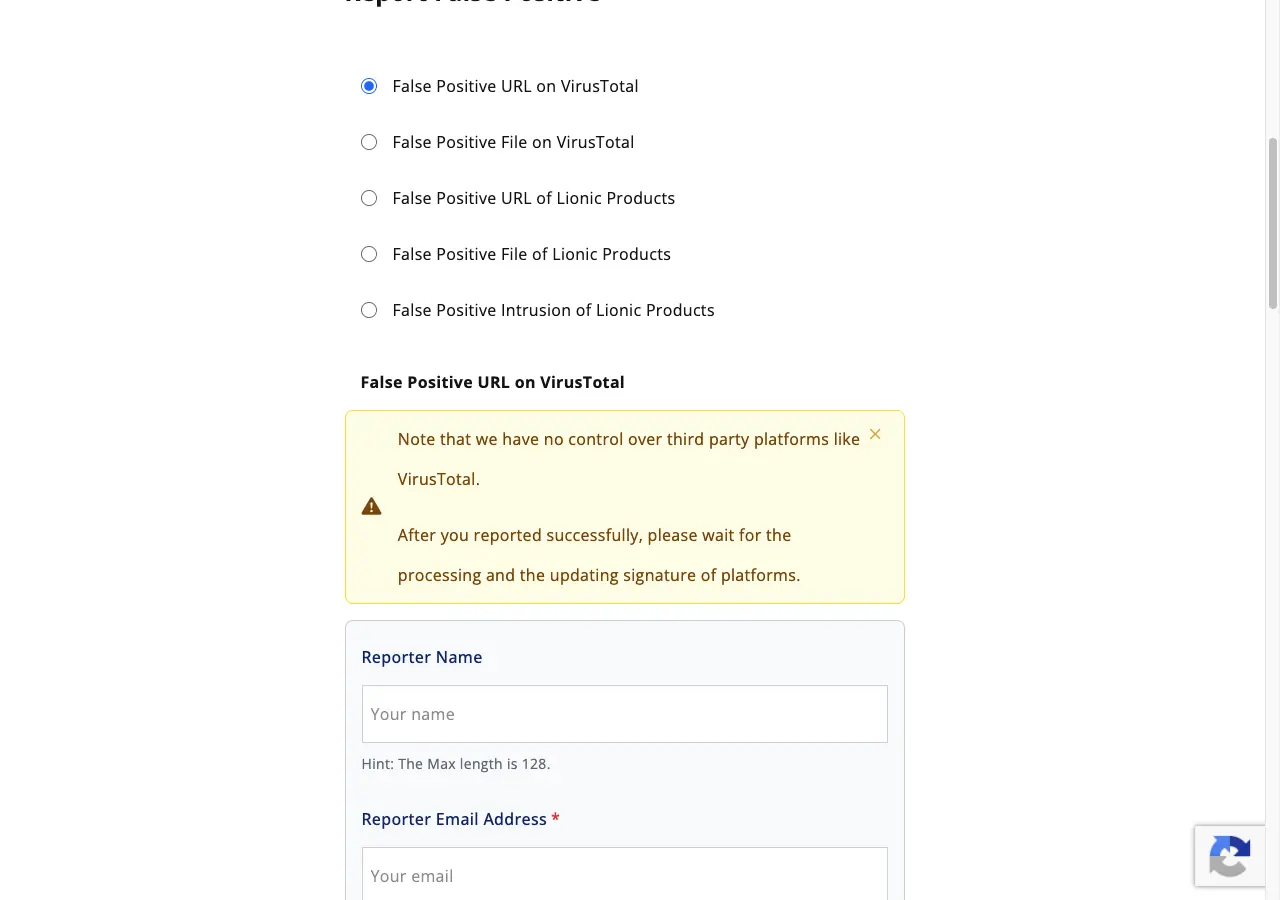
False Positive URL on VirusTotal

Reporter Name:           Name Surname
Reporter Email Address:  name[at]example[.]com
False Positive URL:      hxxps://example[.]com/
Subject:                 example[.]com flagged as phishing by mistake
Message:                 example[.]com is the online shop of Example Ltd. We
                         own the domain. The AegisLab row on VirusTotal
                         flags it as phishing. The only form is the customer
                         login, and it sends data to our own server. We
                         scanned the server on 2026-11-10 and found no
                         injected files. The site has no downloads.
                         Report: hxxps://www[.]virustotal[.]com/gui/url/<id>
                         Please review the verdict.
Privacy policy:          (checked)
Button:                  Submit Only
Wait and check the result
Lionic states no turnaround on the pages we read, so we give none. The form says: "Note that we have no control over third party platforms like VirusTotal. After you reported successfully, please wait for the processing and the updating signature of platforms." Run the Lionic URL check again after a while, then open your VirusTotal report and click Reanalyze to see the AegisLab row.
Other ways to report
AegisLab explains its own rules for false positives on these pages: