
First, what is AhnLab?
AhnLab is a security company based in Pangyo, South Korea. Its site lists products for endpoint, network and cloud security, plus managed security services. VirusTotal lists it as one of its scanning engines, so its verdict on your website appears in VirusTotal scans.
Who can't reach you right now
Where it's used, and who shares it
These engines are independent from AhnLab. If they flag you too, each one needs its own request:
 Google Safe Browsing →
 Kaspersky →
 ESET →
 Bitdefender →
How to tell if you're flagged
 VirusTotal. Scan the URL and look for the Ahnlab row. VirusTotal spells the name that way. The row shows the verdict, and the same scan shows whether other engines agree.
- User reports. Ask affected users for a screenshot of the warning and the address they tried to open. We found no public AhnLab lookup tool for websites.
Asking AhnLab to fix it
Find the AhnLab row on VirusTotal
Open virustotal.com, choose the URL tab and paste the full address of the page. Find the Ahnlab row and note its verdict. Copy the link of the report from your browser, because the email needs it. No account is needed.
Check that it is a mistake
Look through your server for files you did not upload, and check your pages for hidden scripts or redirects. Review every page that collects a password or a card number. Fix anything you find, and write to AhnLab only when the site is clean.
Send the email
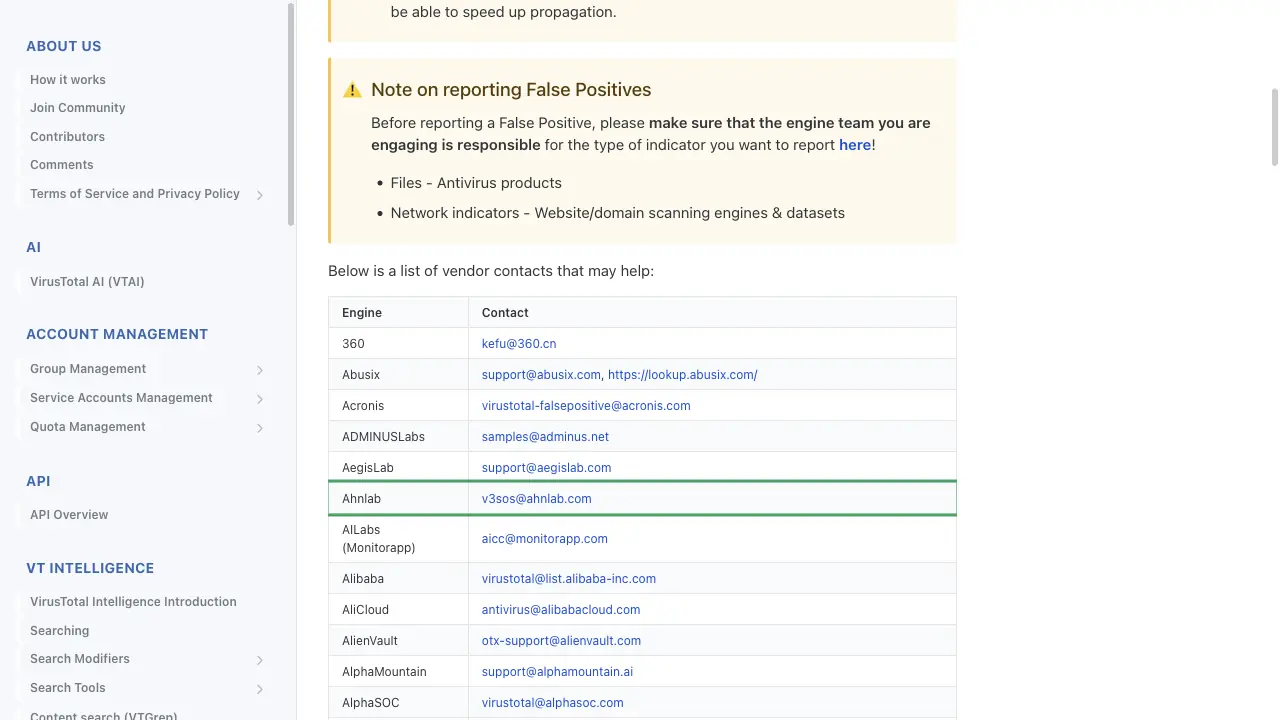
The address comes from VirusTotal's list of vendor contacts at docs.virustotal.com/docs/false-positive-contacts. AhnLab also runs a Threat Inquiry form, described in the next step, and its help article does not say whether that form takes reports about websites. Write to [email protected]. You need no account, and any email address works, so a company address is not required. Put the full URL, the VirusTotal report link, the name of the site owner and what the site does in the body. An earlier copy of VirusTotal's list gave [email protected] and [email protected] for AhnLab. Use those only if the first address stays silent.
To:      v3sos[at]ahnlab[.]com
Subject: False positive: hxxps://example[.]com flagged by AhnLab

Hello,

AhnLab flags the website hxxps://example[.]com on VirusTotal, and the
site is safe.
VirusTotal report: hxxps://www[.]virustotal[.]com/gui/url/<id>

The site belongs to Example Ltd. We own the domain. It is the booking
site of our small dental clinic. Visitors can book an appointment on
hxxps://example[.]com/book, and the form sends data to our own server.
The site has no downloads, and we scanned the server on 2026-11-10 and
found nothing unusual.

Please review the verdict and remove the detection.

Thank you,
Name
Or use the Threat Inquiry form
AhnLab help article "To Submit a Malware-related Inquiry" says false positive reports go through the Threat Report Center. Open AhnLab.com, go to Support, then Threat Inquiry, and sign in to your AhnLab account. The page asks you to sign in, and the sign-in page offers Register if you have no account. The article marks required fields with an asterisk. The form has Title (a short summary), Report Type (the reason for the submission), Email (the address that gets the answer), Product (the AhnLab product in use) and Message (all details). It also wants at least one attachment: category 1 holds the suspicious or false positive files, compressed into a ZIP, and category 2 holds an AhnReport .arc file. Each attachment can be up to 2 GB. The article does not say what to attach for a website with no file, so check that on the form. A box agreeing to the collection and use of personal information must be ticked before you click Submit. The Email field asks for the address that receives the answer and does not ask for a company address, so a personal address is fine. We saw no captcha. The answer arrives by email, and the report history sits under Threat Information Report History in My Page on AhnLab.com.
Title:        False positive: example[.]com
Report Type:  False positive report
Email:        name[at]example[.]com
Product:      the AhnLab product you use
Message:      The website hxxps://example[.]com is flagged by AhnLab on
              VirusTotal. The site is our dental clinic booking site and
              is safe. VirusTotal report: hxxps://www[.]virustotal[.]com/gui/url/<id>
Attachment:   ZIP file (category 1) or AhnReport .arc file (category 2)
Consent:      box ticked
Wait, then reanalyse
AhnLab's pages give no turnaround, so we give none. After a while, open your VirusTotal report and click Reanalyze to see the verdict AhnLab holds now. If nothing changes, write again in the same email thread.
Other ways to report
AhnLab explains its own rules for false positives on these pages: