
First, what is Avira?
Avira is an antivirus brand of Gen Digital. Its products block websites that Avira considers dangerous, so a wrong verdict on your domain or page stops visitors before the page loads.
The same products also detect files. People use Avira on their own computers and phones to keep malware and phishing pages away.
Who can't reach you right now
Where it's used, and who shares it
These engines are independent from Avira. If they flag you too, each one needs its own request:
 Kaspersky →
 ESET →
 Bitdefender →
 Google Safe Browsing →
How to tell if you're flagged
 VirusTotal. Scan your URL and find the Avira row. The same scan shows whether other engines flag you too.
- A clean test machine. Install Avira on a computer or in a virtual machine, update it and open your site.
- User reports. Ask affected users for a screenshot of the Avira warning.
- We found no public Avira page where you can look up a URL, so VirusTotal and a test machine are the checks you have.
Asking Avira to fix it
Find the block
Scan your URL on VirusTotal and find the Avira row to see what Avira says about it. Read the Avira warning on a protected device and copy its text. Write down the full URL that is blocked, with https:// at the start.
Check that it is a mistake
Scan your server and your third-party scripts for injected code. Look at old pages and plugins. Fix anything you find first, then ask Avira for a review.
Send the URL as a suspected false positive
Open the Avira page for suspicious URLs. Under "Submit suspicious URLs as:" choose "Suspected False Positive URLs (Not Malware)". The other option, "Suspicious URLs (Suspected Malware)", reports a site as dangerous, so do not pick it. Enter your URL in the field "URL*". The form takes one URL per submission, so send each blocked URL separately. In the DETAILS box, say what the site is, who owns it and why you think the block is wrong. Click Submit. The form has no email field. You need no account and no company email address. Because the form takes no address, Avira does not reply to you.
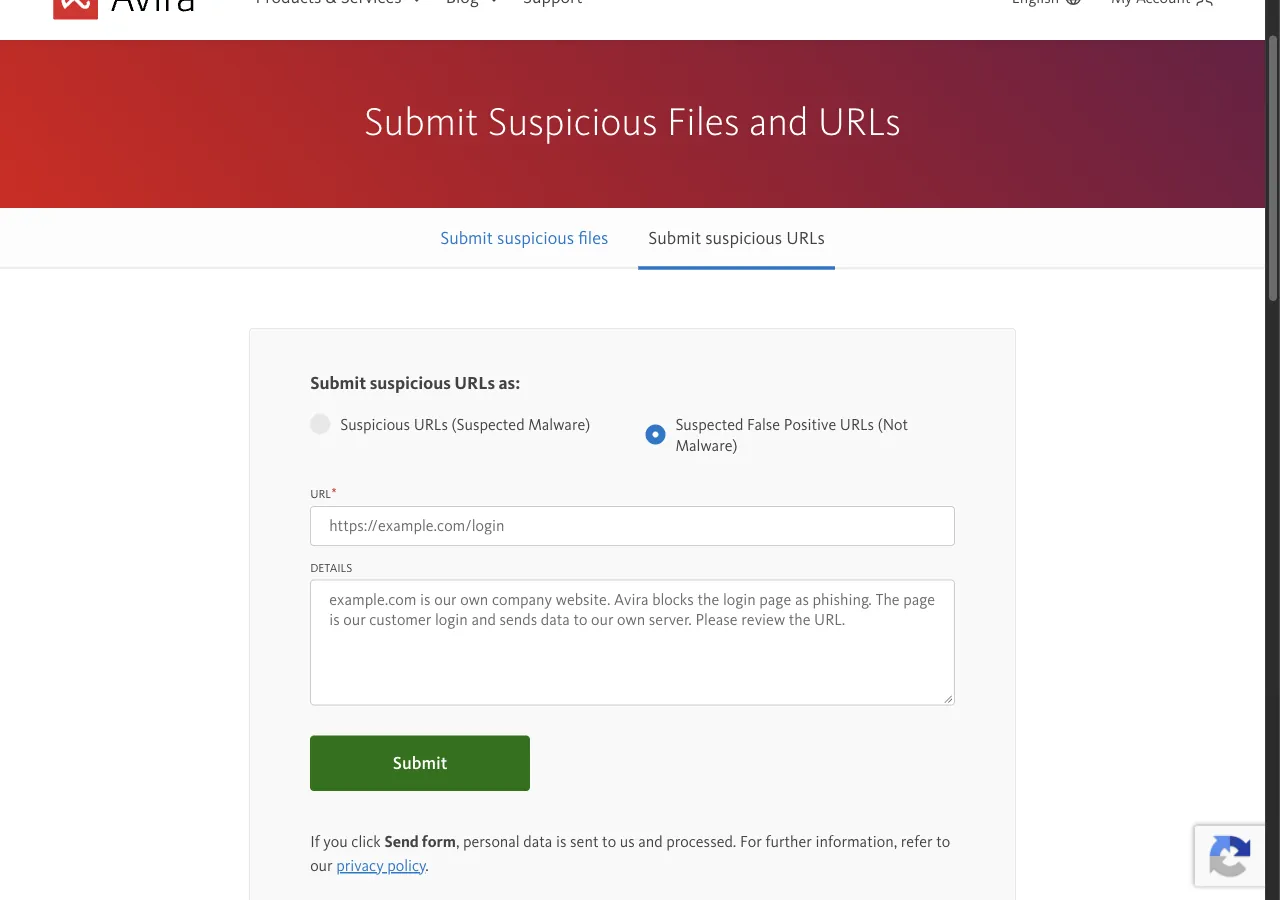
Submit suspicious URLs as: Suspected False Positive URLs (Not Malware)
URL*:     hxxps://example[.]com/
DETAILS:  This is the website of our company, Example Ltd.
          Avira blocks it as dangerous. We own the domain and
          run the site ourselves. The site has no downloads and
          its only form is the customer login. Please review
          the URL and remove it from your database.
Check the result yourself
Avira states no time for a review and sends no message. Later, scan your URL on VirusTotal again and look at the Avira row. Ask affected users to update their Avira product and open your site again. Avira says it removes the URL from its database when the report turns out to be a false positive.
Other ways to report
Avira explains its own rules for false positives on these pages: