First, what is Baidu?
Baidu runs a URL Security Center (网址安全中心) with a URL detection platform at bsb.baidu.com. Its pages say it identifies fraud pages, illegal pages and risky web pages, and its product page lists phishing sites, malicious redirects, embedded malicious code and hacked websites as risk cases.
VirusTotal also lists Baidu as a scanning engine, so a Baidu verdict on your website can show up in a VirusTotal scan. Baidu's pages do not say which of its products display the warning, so we cannot list them.
Who can't reach you right now
Where it's used, and who shares it
These engines are independent from Baidu. If they flag you too, each one needs its own request:
 Google Safe Browsing →
 Kaspersky →
 ESET →
 Bitdefender →
How to tell if you're flagged
 Baidu URL Security Center (网址安全中心). Enter your address in the box and press 查询 (Query). The page does not describe the result layout, so note what it shows for your URL.
 VirusTotal. Scan the URL and look for the Baidu row.
- User reports. Ask affected visitors for a screenshot of the warning they see.
Asking Baidu to fix it
Look up your URL
Open bsb.baidu.com, type the full address of your page in the query box and press 查询. Write down what the result says and which page you checked. The page text is in Chinese.
Check that it is a mistake
Baidu's appeal page says the form is for sites with no risky behaviour or sites that already fixed the flagged pages. Scan your server and your scripts for injected code, check for hacked pages, and clean anything you find first. Baidu's product page lists embedded malicious code and hacked websites as risk cases.
Send the appeal form
Open the appeal form at bsb.baidu.com/appeal (the menu calls it 申诉举报 or 误报申诉). We saw no login on the form, so an account is not needed. The form has no field for a company name and its email field is labelled 联系邮箱 (contact email), so a personal address is fine. Fill the fields in this order: 网页地址 (page address), 申诉理由 (reason, 200 characters at most: the site type and how it was wrongly flagged), 联系邮箱, 申诉类型 (appeal type, a choice between 非经营性网站 non-commercial site and 经营性网站 commercial site) and 验证码 (captcha), then press 提交申诉. We could not verify what the form asks next after you pick the commercial type. An earlier check of the form saw a file upload (jpg or png up to 2MB), but the latest capture does not show one. If the form asks for a file, send a screenshot of your home page. The page does not mark which fields are required. VirusTotal also lists [email protected] and [email protected] for Baidu. We found those only on VirusTotal's list of vendor contacts, so use them only if the form fails.
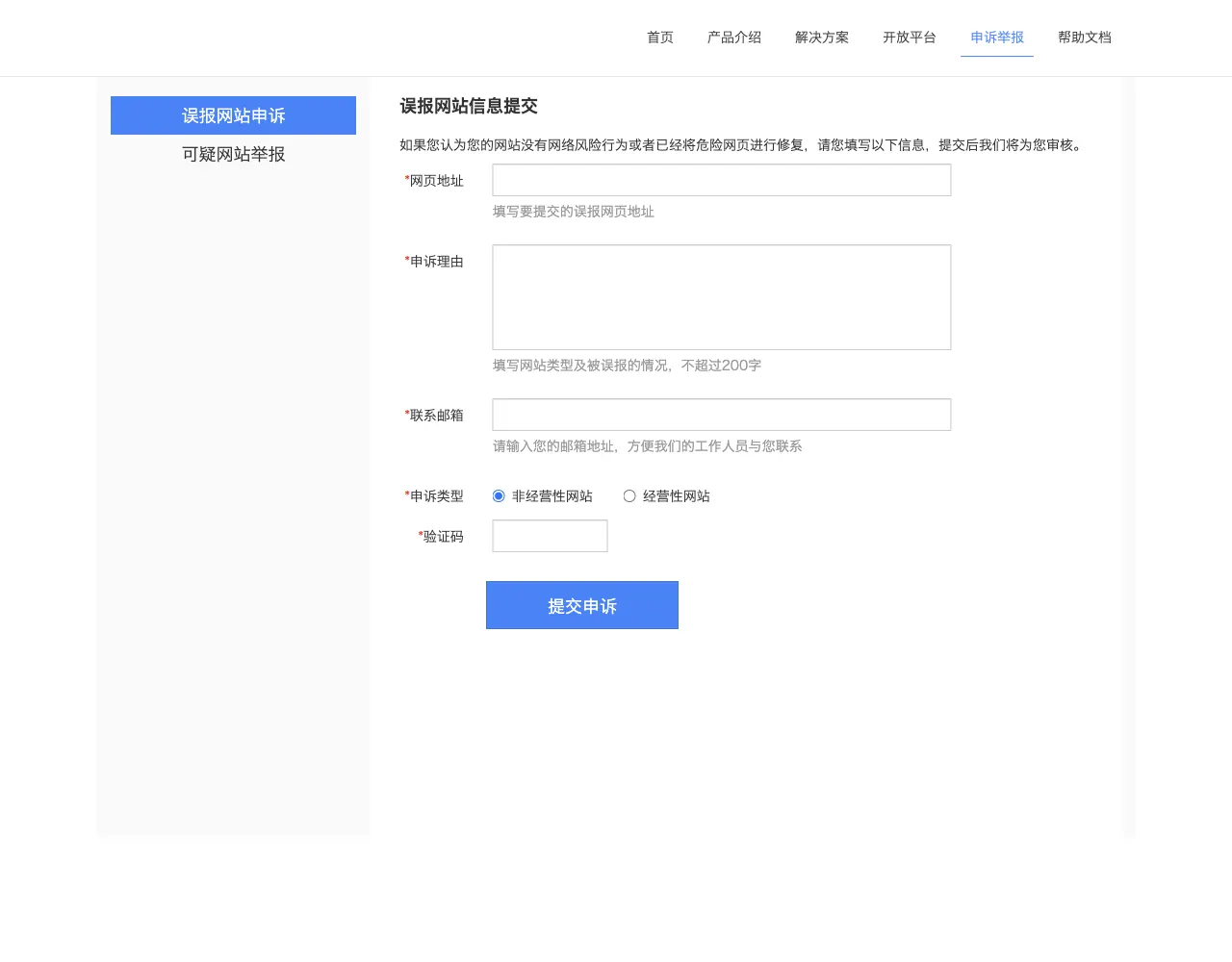
Form:     hxxp://bsb[.]baidu[.]com/appeal
网页地址 (page address):  hxxps://example[.]com/
申诉理由 (reason):  Online shop for hand-made furniture. The site was reported as a risky page. It has no malicious code. We scanned the server and found nothing.
联系邮箱 (email):  name[at]example[.]com
申诉类型 (type):  经营性网站 (commercial site)
验证码 (captcha):  the code shown on the form
Wait and check the result
Baidu's FAQ says: "我们收到反馈后,会尽快对网站进行重新检测。如果确认不再包含风险内容,正常情况下两个工作日内能解除风险提示。" In English, Baidu re-checks the site after your feedback, and if it confirms no risky content, the warning is normally lifted within two working days. After that, run the same lookup at bsb.baidu.com again. If the warning stays, send the form again with a clearer reason.
Other ways to report
Baidu explains its own rules for false positives on these pages: