First, what is ChainPatrol?
ChainPatrol is a blocklist for crypto and Web3 scams and phishing. It marks a website, a domain or another asset as Blocked only after a person has reviewed it. The reviewer works at ChainPatrol or at a scanning partner.
Site owners meet it when their domain lands on the list. ChainPatrol has a public search page where anyone can look up a URL, and a separate dispute page where the owner of a domain asks for a second review.
Who can't reach you right now
Where it's used, and who shares it
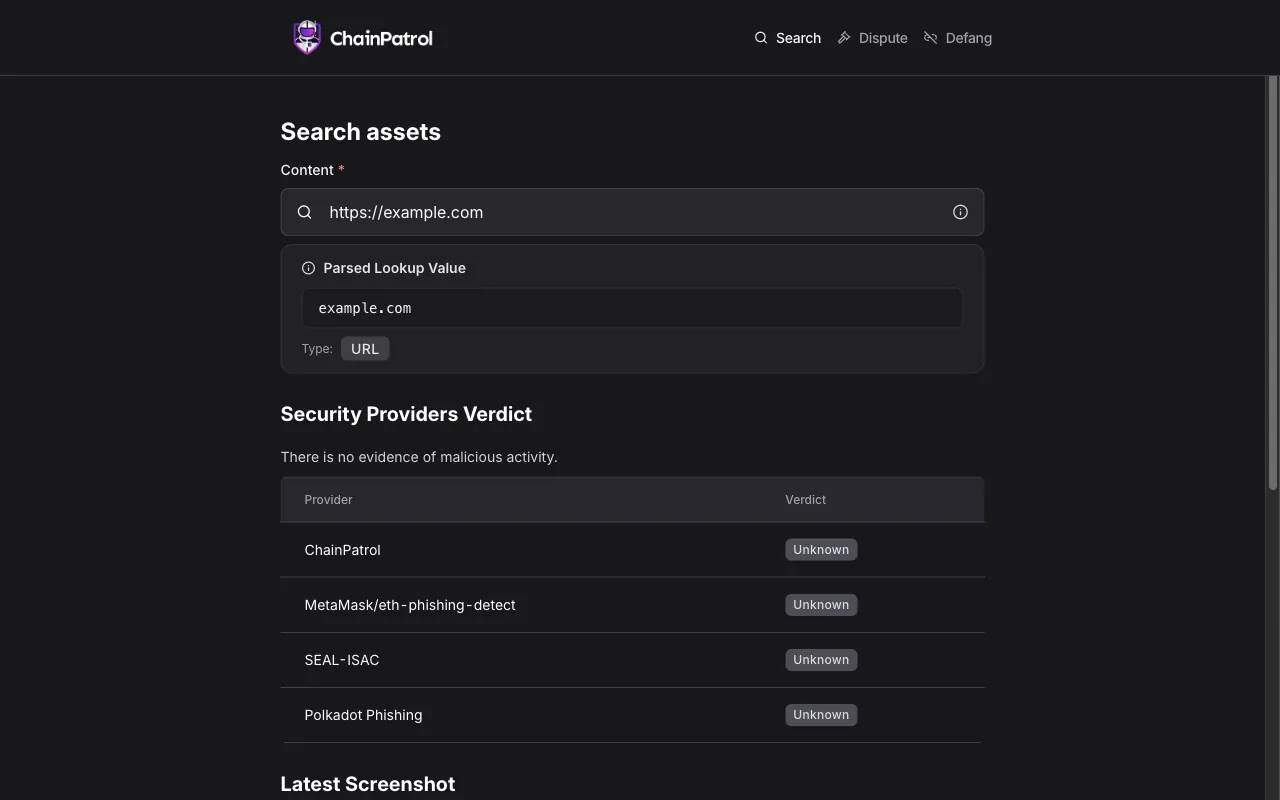
The ChainPatrol search result shows a Security Providers Verdict with four rows: ChainPatrol, MetaMask/eth-phishing-detect, SEAL-ISAC and Polkadot Phishing. Each row is a separate list with its own verdict. ChainPatrol does not say on its pages which products read its own list.
These engines are independent from ChainPatrol. If they flag you too, each one needs its own request:
 Google Safe Browsing →
 Kaspersky →
 ESET →
 Bitdefender →
How to tell if you're flagged
 ChainPatrol search (app.chainpatrol.io/search). Enter the full URL of your site. The result shows the Security Providers Verdict for ChainPatrol, MetaMask/eth-phishing-detect, SEAL-ISAC and Polkadot Phishing, and a latest screenshot of the page.
 VirusTotal. Scan the URL and read the rows of the other engines. The same scan shows whether anyone else flags you too.
- User reports. Ask visitors for a screenshot of the warning and the address they opened. It shows which tool blocked the page.
Asking ChainPatrol to fix it
Look up your URL
Open app.chainpatrol.io/search. The page has three tabs: Search, Dispute and Defang. On the Search tab, enter the full address with https and the domain, for example https://www.example.com. The result shows the Security Providers Verdict with one row each for ChainPatrol, MetaMask/eth-phishing-detect, SEAL-ISAC and Polkadot Phishing. A verdict such as Unknown can appear in any row. The result also shows a latest screenshot of the page. You need no account to search.
Check that it is a mistake
Scan your server, your plugins and your third-party scripts for injected code, and look for pages you did not create. Fix anything you find first, then ask for the review.
Send the dispute
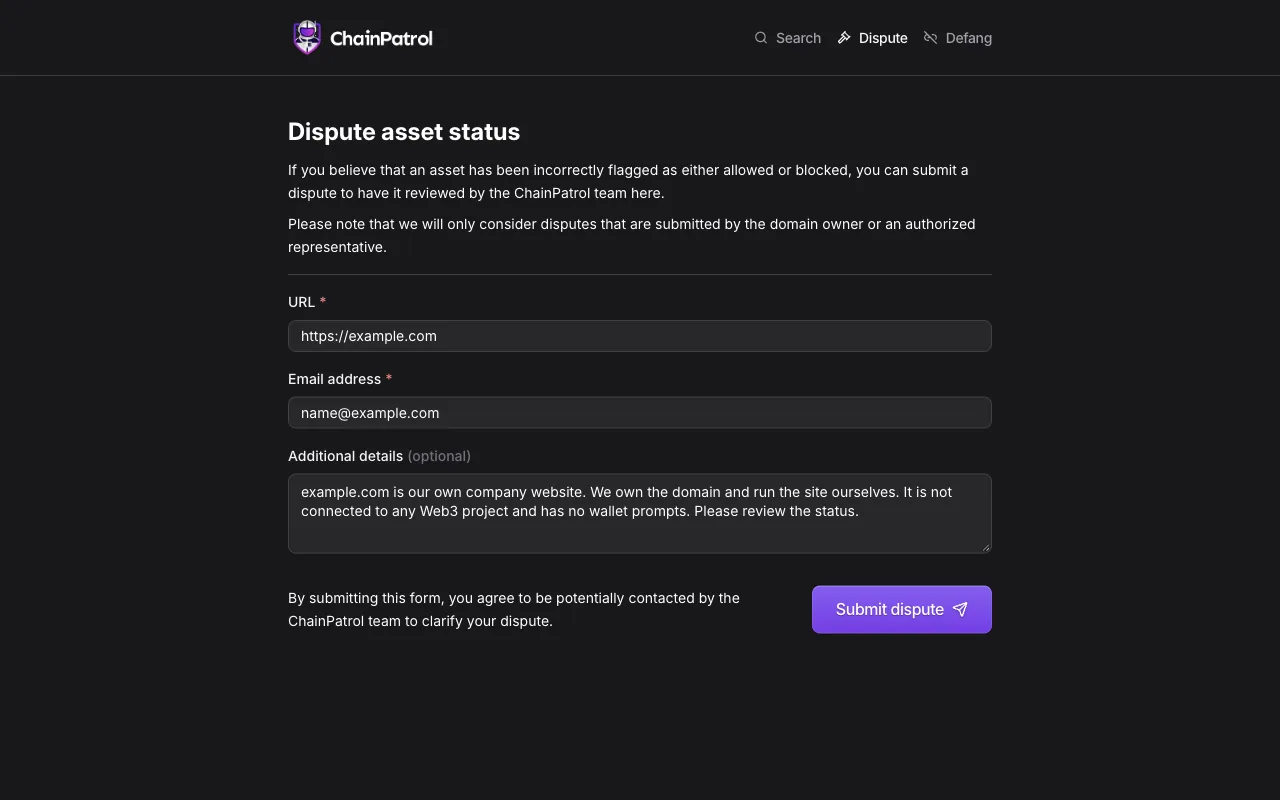
Open the Dispute tab at app.chainpatrol.io/dispute. The form is called Dispute asset status and has three fields, in this order: URL (required), Email address (required) and Additional details (optional). Enter the URL in the same format as in the search, the full address with https and the domain. The form does not ask for a company name or a company email address, so a personal email address is fine. You need no account to send it, and the page shows no captcha. ChainPatrol says it only considers disputes that come from the domain owner or an authorized representative, so send it as the owner. By submitting, you agree that the ChainPatrol team can contact you to clarify the dispute, so use an address you read. Then click Submit dispute. In Additional details, say what the site is, who owns it and what its pages collect from visitors.
Website flagged as phishing

URL:                 hxxps://www[.]example[.]com
Email address:       name[at]example[.]com
Additional details:  hxxps://www[.]example[.]com is the website of
                     our company, Example Ltd. ChainPatrol lists it
                     as Blocked. We own the domain and run the site
                     ourselves. The only form is the customer login,
                     and it sends data to our own server. The site
                     does not ask for wallet keys or seed phrases.
                     Please review the status.
Wait and check the result
ChainPatrol says on its false positives page that it will review the dispute "as soon as possible" and take "the appropriate action". It names no time frame. Search your full URL again after a few days and read the ChainPatrol row. For legal issues, ChainPatrol names the address [email protected].
Other ways to report
ChainPatrol explains its own rules for false positives on these pages:
VirusTotal's list of vendor contacts gives this address for false positive reports to ChainPatrol. Use it when the route above does not work for you. Put the full URL and the link to your VirusTotal report in the message. A personal email address is fine.
[email protected]