First, what is Dr.Web?
Dr.Web is the antivirus of the Russian company Doctor Web. Its URL filter, called Parental Control or Office Control, blocks websites that appear on its lists, such as "Known infection sources" and "Non-recommended websites". A site on one of these lists stops loading for the user.
The same antivirus scans files, so an installer or an app can also be flagged. Website owners meet the URL filter first, and software makers meet the file scanner.
Who can't reach you right now
Where it's used, and who shares it
Dr.Web is developed by Doctor Web. We found no current list of products that run on the Dr.Web engine, so a fix here is a fix for Dr.Web only.
These engines are independent from Dr.Web. If they flag you too, each one needs its own request:
 Kaspersky →
 ESET →
 Bitdefender →
 Microsoft Defender →
How to tell if you're flagged
 Dr.Web URL checker (vms.drweb.com/online). Enter your URL and read the verdict.
- Dr.Web file scanner (vms.drweb.com/scan_file). It takes files up to 10 MB.
 VirusTotal. Scan the URL or file and find the DrWeb row. The same scan shows whether other engines flag you too.
- User reports. Ask affected users for a screenshot of the block page or the warning. It shows the filter category or the detection name.
FormatDr.Web names are separated by dots, with a prefix first and the family after it.Trojan.A prefix at the start of the name. The family follows after the dot.Program.A potentially dangerous program.Tool.A hacktool..originA name that ends in .origin was detected by Origins Tracing, which flags resemblance to known threats.probablyA name that contains probably was detected by the heuristic analyzer.Asking Dr.Web to fix it
Collect the details
For a website, write down the full URL and the filter category shown for it, for example "Known infection sources" or "Non-recommended websites". For a file, keep the file itself and the detection name from the warning.
Check that it is a mistake
Scan your server and your third-party scripts for injected code. For files, rebuild from clean source and check your dependencies. Fix anything you find first.
Report a website
Open the Dr.Web URL filter form, titled "Report a Dr.Web Parental/Office Control false positive/missed malicious link". It needs no account and does not ask for a company email address, so a personal one is fine. Choose the report category "False alarm". Fill in your name or organisation, your email, the filter, the URL and a comment. Enter the code from the picture and tick the Privacy Policy box. A website has no file to send. Explain who owns the site and what it does.
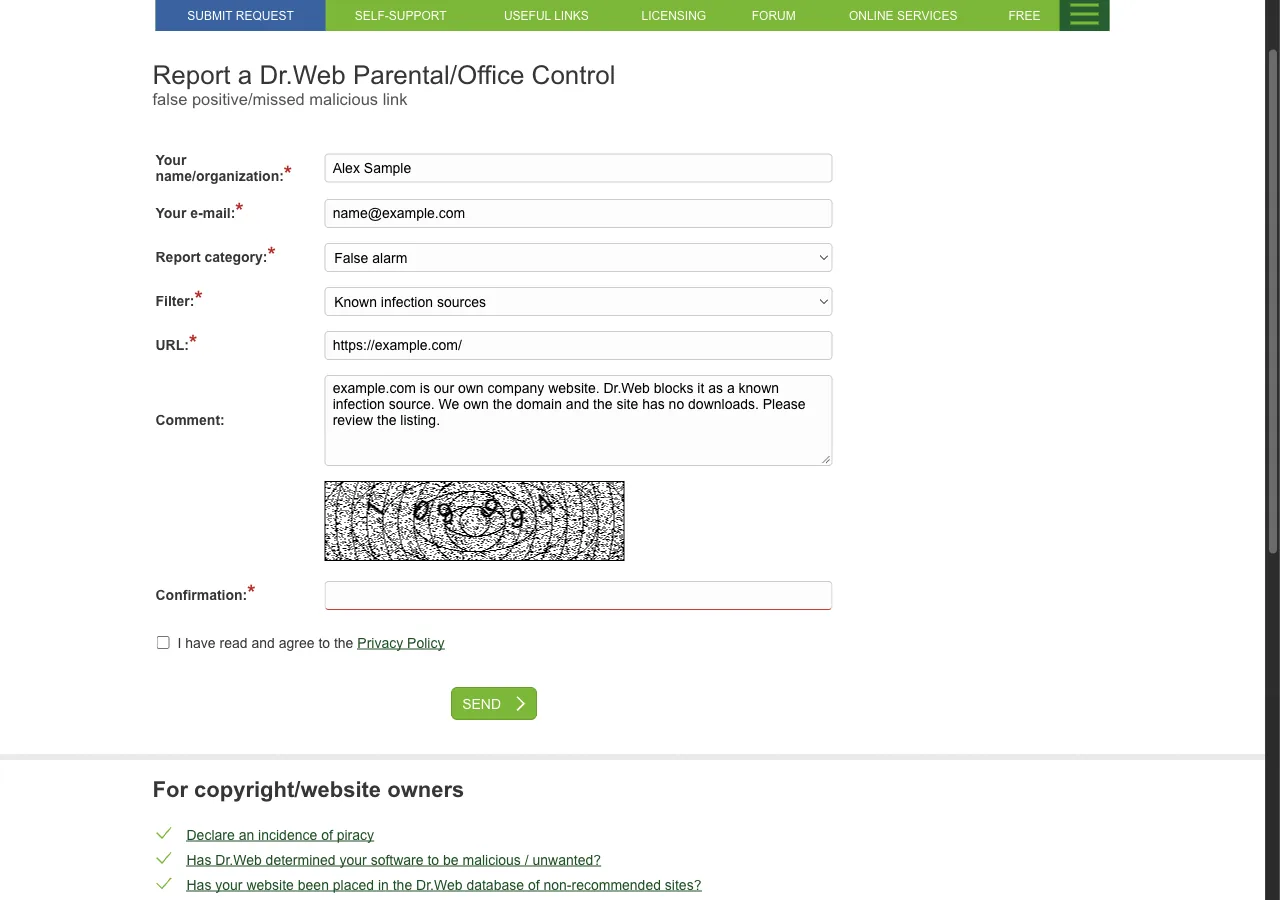
Website listed under Known infection sources

Name or organisation: Example Ltd
Email:                name[at]example[.]com
Report category:      False alarm
Filter:               Known infection sources
URL:                  hxxps://example[.]com/
Comment:              hxxps://example[.]com is the website of our
                      company, Example Ltd. We own the domain and run
                      the site ourselves. It offers nothing to download
                      and the only form is the customer login. Please
                      remove it from the list.

Site flagged as fraudulent

Name or organisation: Example Ltd
Email:                name[at]example[.]com
Report category:      False alarm
Filter:               Non-recommended websites
URL:                  hxxps://example[.]com/shop
Comment:              This page is our online shop. Dr.Web flags it as
                      fraudulent. We own the domain and the page sells
                      our own products. Please review the verdict.
Report a file
Open the Dr.Web sendvirus form. It needs no account and does not ask for a company email address, so a personal one is fine. Choose the category "False positive". The form takes one file per request, up to 100 MB. For a larger file, use "Specify the link". The page asks for archives protected with the password "virus". A Dr.Web serial number is optional, and Dr.Web says such requests are processed first. Complete the captcha and send.
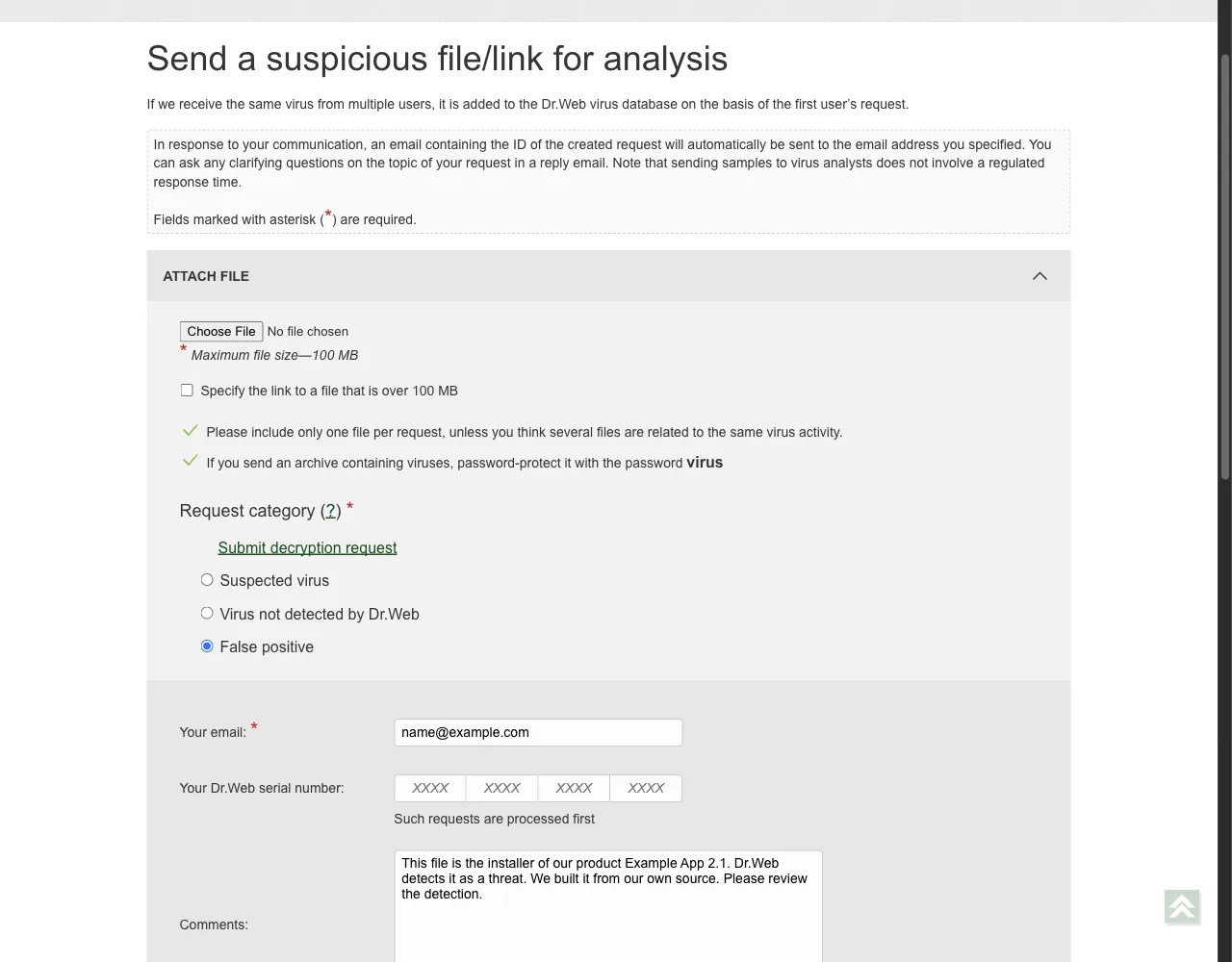
Email:          name[at]example[.]com
Category:       False positive
File:           example-app-setup.zip (one file, password: virus)
Serial number:  (optional)
Comment:        This archive holds the installer of our product
                Example App 2.1. Dr.Web detects it as
                Trojan.Example.1. We built it from our own source.
                The official download page is
                hxxps://example[.]com/download. Please review the
                verdict.
Use the owner form when you are the company
If you are the company behind the site or the software, use the Site/program copyright holder application. It asks for your full name, email, country, company name, tax ID, job title, company site, an attached file and a description of the Dr.Web error. This form is for companies, so it asks for company details that the first two forms do not.
Wait and check the result
Dr.Web says that "sending samples to virus analysts does not involve a regulated response time". You get an automatic email with the request ID, and you can reply to it to add details. Re-check the URL or file on the URL checker, the file scanner and VirusTotal. Ask affected users to update their Dr.Web databases and try again.
Other ways to report
Dr.Web explains its own rules for false positives on these pages:
VirusTotal's list of vendor contacts gives this address for false positive reports to Dr.Web. Use it when the route above does not work for you. Put the full URL and the link to your VirusTotal report in the message. A personal email address is fine.
[email protected]