
First, what is HaGeZi?
HaGeZi is a set of community DNS blocklists on GitHub, run by one maintainer. The lists cover ads, trackers, malware and scams, and they come in tiers from Light to Ultimate. When a domain is on a list, a DNS filter refuses to resolve it, so your website does not load for the people behind that filter.
People use the lists in two ways. Some run their own filtering DNS, for example with Pi-hole or AdGuard Home. Others use an online DNS service that has the lists built in. There is no file to scan here, only domain names.
Who can't reach you right now
Where it's used, and who shares it
Only visitors whose DNS uses a HaGeZi list are affected. Everyone else reaches your site as usual.
The project README names these DNS services as users of the lists:
 AdGuard DNSUses HaGeZi listsControlDUses HaGeZi listsHaGeZi DNSUses HaGeZi listsDNSBUNKER.orgUses HaGeZi listsPublic RDNSUses HaGeZi listsRobinGroppe.deUses HaGeZi listsRethinkDNSUses HaGeZi listsDNSwardenUses HaGeZi listsOpenBLD.netUses HaGeZi lists
These engines are independent from HaGeZi. If they flag you too, each one needs its own request:
 Google Safe Browsing →
 Kaspersky →
 ESET →
 Bitdefender →
How to tell if you're flagged
- HaGeZi Blocklist Lookup (hagezi-mirror.dnsbunker.org/listseek.php). Paste your domain and the page lists every HaGeZi list that blocks it, with the exact rule.
 VirusTotal. Scan the URL to see whether security engines flag it too. A clean result there does not clear a DNS blocklist, because HaGeZi lists are separate from those engines.
- A device that uses a HaGeZi list. If your domain does not resolve there but resolves on a normal connection, a DNS filter is blocking it.
- User reports. Ask the affected person which DNS service or filter they use and which list tier they picked.
Asking HaGeZi to fix it
Look up your domain
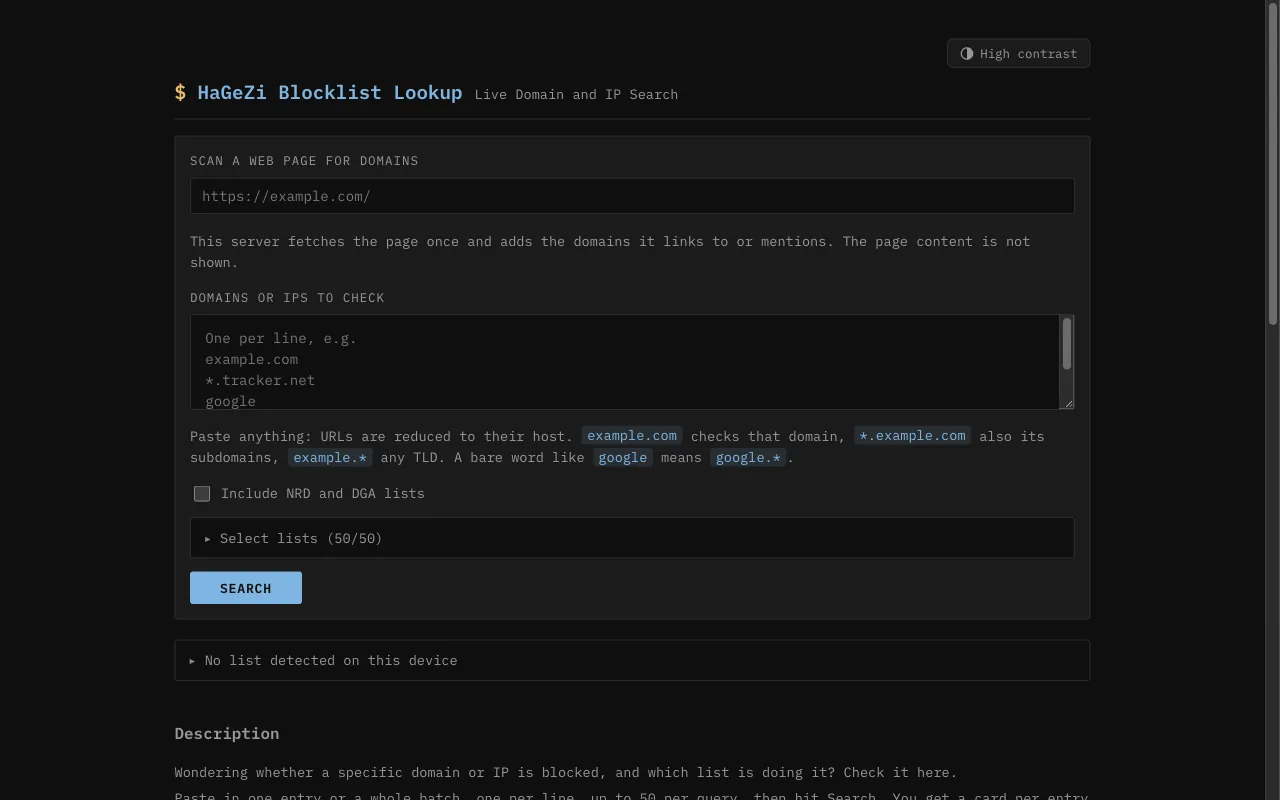
Open the HaGeZi Blocklist Lookup. Paste your domain, one per line, up to 50 at a time. A full URL works too, because the page reduces it to the domain. The result is a card for each entry that names every list blocking it and the exact rule. The NRD and DGA lists are not searched unless you tick Include NRD and DGA lists, so tick it if your domain is newly registered. The lookup reads the published lists, not your own setup.
Check that it is a mistake
Make sure the site is clean and that the block comes from a HaGeZi list and not from a browser blocker or another list. A site can also break because a different domain it loads, such as a CDN or tracker, is blocked. If the block is meant, for example on a gambling or piracy list, HaGeZi declines the request.
Open an Allowlist Request on GitHub
Go to github.com/hagezi/dns-blocklists/issues and open a new issue. Opening an issue sends you to the GitHub sign-in page, so you need a GitHub account. A personal account is fine, and the form asks for no company name or company email. Choose the template Allowlist Request. It has these fields, in this order: the prerequisite checkboxes (you use the current version of the lists, and disabling the lists resolves the issue); Operating system; Which blocklist(s) caused the issue; Where does the issue occur - on which website or in which app?; Which domain(s) need to be unblocked?; Why should the domain(s) be unblocked?; and the final confirmations (you checked with the Blocklist Lookup, the issue is not already declined, and you gave enough details). Do not post sexually explicit or private information. In the reason, name the exact domain, the list and tier, and what broke.
Website blocked by a HaGeZi list

Prerequisites:  tick both required boxes
Operating system:  Windows
Which blocklist(s) caused the issue:  Multi PRO
Where does the issue occur:  The website hxxps://example[.]com
Which domain(s) need to be unblocked:  example[.]com
Why should the domain(s) be unblocked:
  example[.]com is the website of our company, Example Ltd.
  The Blocklist Lookup shows it on Multi PRO. We own the
  domain and run the site ourselves. The site has no ads,
  trackers or downloads, and visitors on this list cannot
  open it. Please remove it.
Confirmations:  tick all required boxes
Wait and check the result
HaGeZi states no turnaround time. Its FAQ calls GitHub issues the fastest way to get a false positive fixed. Watch the issue for questions from the maintainer, then run the Blocklist Lookup again to see whether the entry is gone. The lookup mirror runs up to a day ahead of the GitHub, GitLab and Codeberg copies, and a DNS service may need time to refresh its copy. If GitHub is not an option, the FAQ also names the email address [email protected] for support.
Other ways to report
HaGeZi explains its own rules for false positives on these pages: