
First, what is SafeToOpen?
SafeToOpen is an anti-phishing URL scanner. VirusTotal lists it as one of its URL scanning vendors, and a SafeToOpen verdict shows up as its own row in the VirusTotal report.
On its own site SafeToOpen sells browser protection (extensions for Chrome, Edge, Safari and Firefox) and email protection (add-ins for Outlook and Gmail). Its VisionAI engine judges a page by how it looks and behaves, and SafeToOpen also runs a free URL scanner at scan.safetoopen.com that needs no account.
Who can't reach you right now
Where it's used, and who shares it
These engines are independent from SafeToOpen. If they flag you too, each one needs its own request:
 Google Safe Browsing →
 Kaspersky →
 ESET →
 Bitdefender →
How to tell if you're flagged
 VirusTotal. Scan the URL and look for the SafeToOpen row. It shows the verdict SafeToOpen holds for your site, and the same scan shows whether other engines flag you too.
- User reports. Ask affected users for a screenshot of the warning they see.
Asking SafeToOpen to fix it
Find the SafeToOpen row on VirusTotal
Open virustotal.com, choose the URL tab and paste the full address of your page. Look for the SafeToOpen row and note its verdict. Copy the link of the report from your browser, because you can paste it into the form. No account is needed.
Check that it is a mistake
Scan your server and your third-party scripts for injected code, and look at every page that asks visitors for a password or payment details. Fix anything you find first. Ask SafeToOpen only when the site is clean.
Fill in the unblock form
Open the official form at safetoopen.com/en/unblock. The page needs no sign-in and no account. A Cloudflare check box sits above the button, and it can pass on its own. It asks for no company name and no company email, so a personal address works. The fields come in this order: Full name (required), Email (required), Website to unblock (required; the full address you want reviewed and removed from threat lists), Your relationship to the site (required; I own this website, I work for / represent the owner, I'm the hosting provider or Other), Also request removal from VirusTotal? (Yes, please request removal, or No) and Why should it be unblocked? Then press Submit request. If you prefer email, VirusTotal's list of vendor contacts at docs.virustotal.com/docs/false-positive-contacts names [email protected].
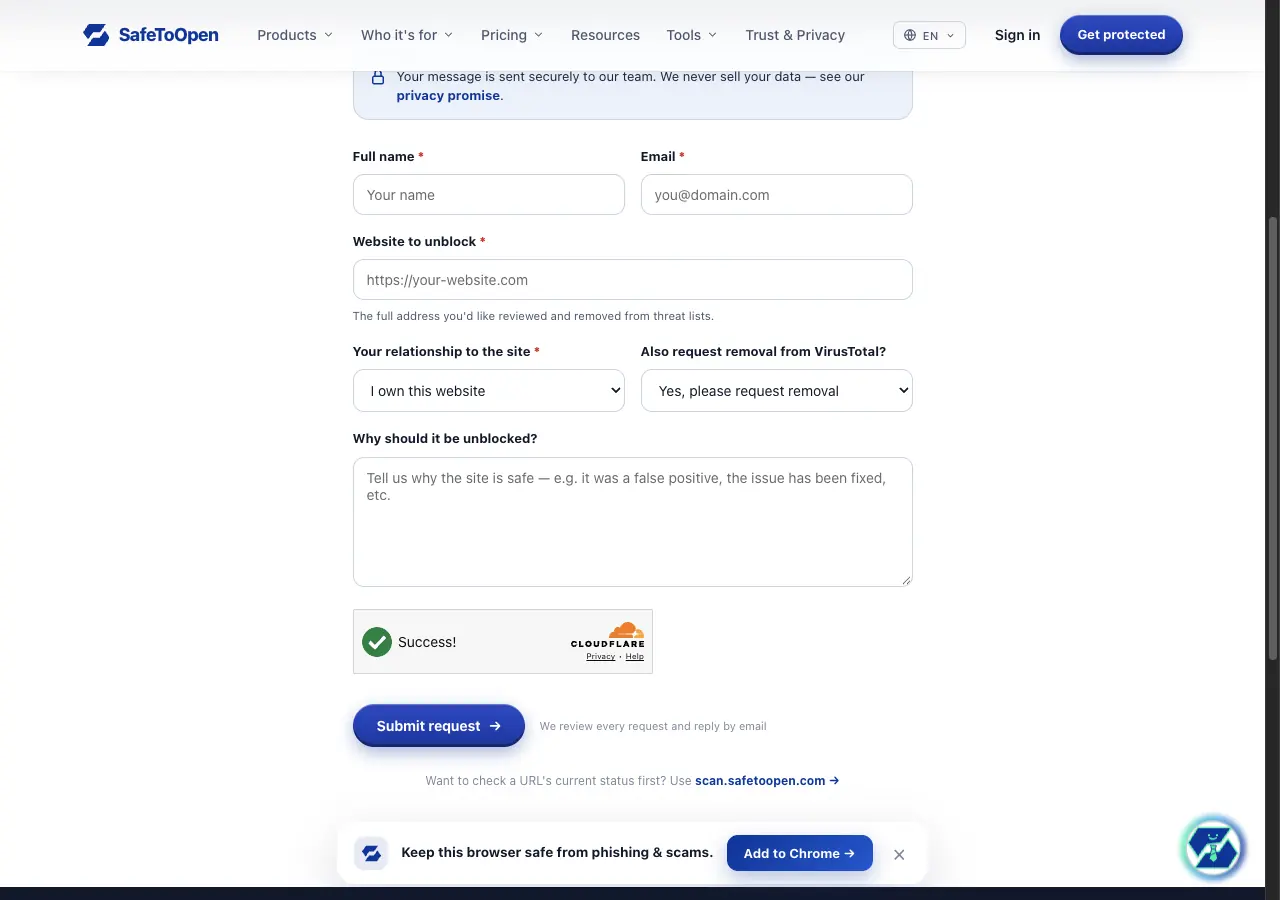
Full name:                         Name
Email:                             name[at]example[.]com
Website to unblock:                hxxps://example[.]com
Your relationship to the site:     I own this website
Also request removal from VirusTotal?  Yes, please request removal
Why should it be unblocked?

hxxps://example[.]com is flagged as phishing by SafeToOpen on VirusTotal.
VirusTotal report: hxxps://www[.]virustotal[.]com/gui/url/<id>

The site belongs to Example Ltd, and we own the domain. It is the online
shop for our hand-made furniture. The only form is the customer login at
hxxps://example[.]com/login, and it sends data to our own server. The site
offers nothing to download.
Wait, then reanalyse
SafeToOpen says it reviews every request and replies by email, and it states no turnaround, so we give none. After a while, open your VirusTotal report and click Reanalyze. The SafeToOpen row shows the verdict it holds now. If nothing changes, answer the reply email from SafeToOpen.
Other ways to report
SafeToOpen explains its own rules for false positives on these pages: