
First, what is VIPRE?
VIPRE is an antivirus and security company. Its products check the websites people open and the files they download or run, and they block what they rate as dangerous.
When VIPRE rates your website as unsafe, its users see a warning instead of your page. When it flags your file, the product stops it. VIPRE runs a Helpdesk where you can ask for a website to be reclassified or report a false positive.
Who can't reach you right now
Where it's used, and who shares it
These engines are independent from VIPRE. If they flag you too, each one needs its own request:
 Kaspersky →
 ESET →
 Avast / AVG →
 Google Safe Browsing →
How to tell if you're flagged
 VirusTotal. Scan the URL or file and find the VIPRE row. Look at the BitDefender row too, because VIPRE uses the Bitdefender engine.
- A clean test machine. Install a trial of a VIPRE product in a virtual machine, update it and open your site or run your file.
- User reports. Ask affected users for a screenshot of the VIPRE warning, with the full URL of the page.
- We found no public VIPRE URL lookup, so VirusTotal and user reports are the checks available.
Asking VIPRE to fix it
Find the block
Scan your URL on VirusTotal and note the VIPRE row and the BitDefender row. Take a screenshot of the VIPRE warning, and copy the full URL of the page that is blocked.
Check that it is a mistake
Scan your server and your scripts for injected code, and rebuild files from clean source. If your site was hacked in the past, remove the malicious pages first. Then say in your request what the site is and who owns it.
Send a Website Reclassification request
Open helpdesk.vipre.com/hc/en-us/requests/new and choose the request type Website Reclassification. The form has these fields in order: Your email address, Subject, I am a, Support Region, Type, URL / Website and Description. It also has an optional Attachments field. Under Type, choose False Positive. In URL / Website, enter the full URL. In Description, say what the site is and who owns it. You need no account, and the page opens without signing in. The email field is not labelled as a company email, so a personal address is fine. A site flagged as phishing has no file, so you attach nothing except an optional screenshot. The page shows a short Cloudflare check before it opens.
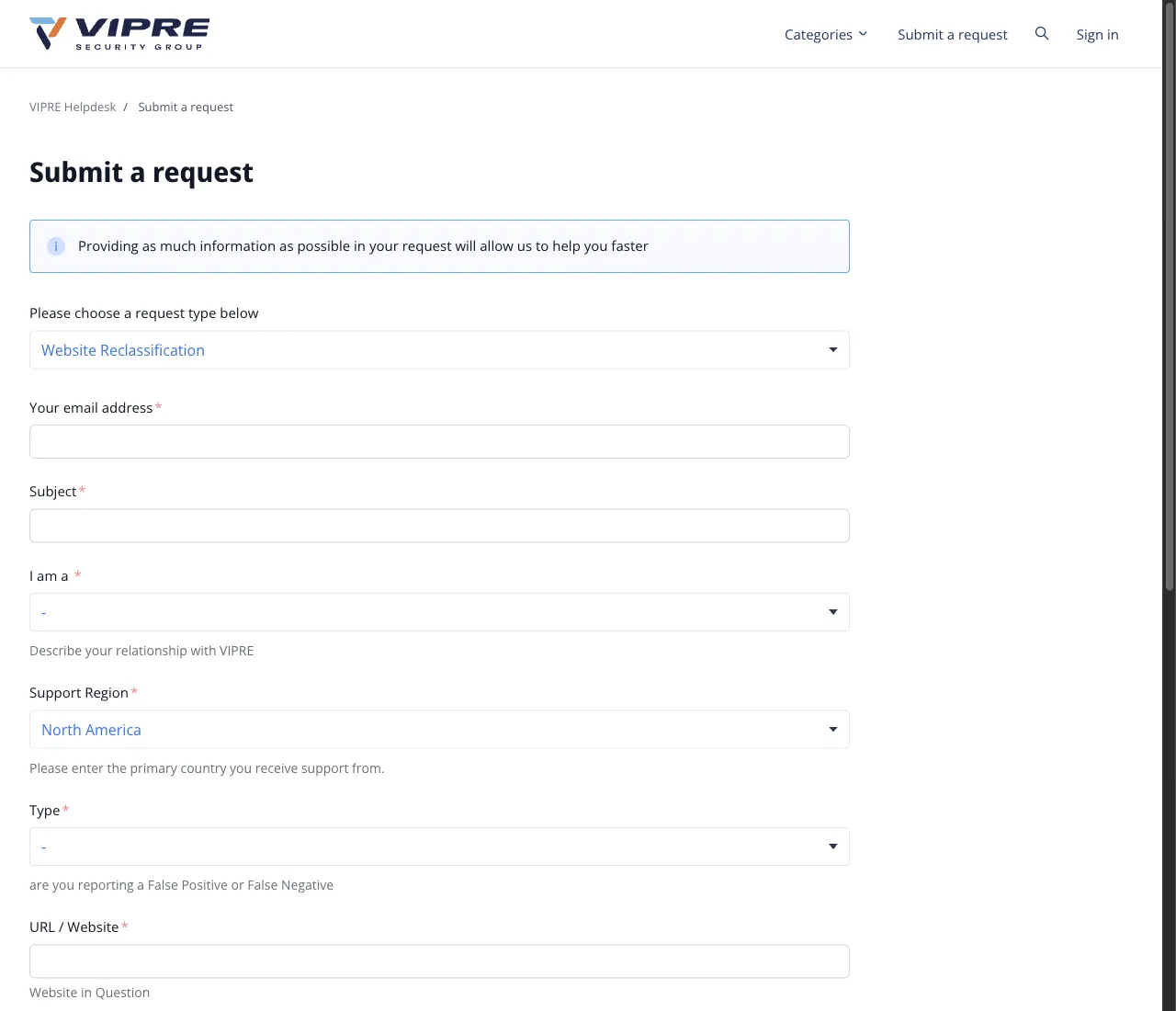
Website flagged as phishing

Request type:         Website Reclassification
Your email address:   name[at]example[.]com
Subject:              False positive: example[.]com blocked as phishing
I am a:               <option that describes you, for example website owner>
Support Region:       North America (the default)
Type:                 False Positive
URL / Website:        hxxps://example[.]com/page
Description:          hxxps://example[.]com is the website of our company,
                      Example Ltd. VIPRE blocks it as phishing. We own
                      the domain and run the site ourselves. The only
                      form is the customer login, and it sends data to
                      our own server. The site has no downloads.
                      Please review the verdict.
Attachments:          vipre-warning.png (optional)
Report a file
For a file, open the same Helpdesk page and choose the request type Report a False Positive. We did not read the fields of that form, so fill in what it asks for and say where the file comes from.
Wait and check the result
The form says: "A member of our support staff will respond as soon as possible." Once VIPRE answers, scan your URL on VirusTotal again and look at the VIPRE row and the BitDefender row. Ask affected users to update their product and try again.
Other ways to report
VIPRE explains its own rules for false positives on these pages:
An earlier copy of VirusTotal's contact list also named this address for VIPRE. The current list no longer shows it, so try the route above first.
[email protected]