First, what is Webroot / BrightCloud?
BrightCloud is a database that gives every website and IP address a category and a reputation score. It is now run as OpenText Threat Intelligence, and the old brightcloud.com addresses redirect to it. Its analysts review the sites that people ask about.
BrightCloud does not block anything itself. Firewalls, security software and other partner products read the category and the score, and their own policy decides what to block. When your site has the wrong category or a low score, those products can stop people from opening it.
Who can't reach you right now
Where it's used, and who shares it
These engines are independent from BrightCloud. If they flag you too, each one needs its own request:
 Google Safe Browsing →
 Kaspersky →
 ESET →
 Bitdefender →
How to tell if you're flagged
 The OpenText Threat Intelligence URL or IP lookup (support.threatintel.opentext.com/tools/url-ip-lookup.php). For a URL it shows the category, the reputation score and basic WhoIs data. For an IP address it shows the threat status, the location and the domains hosted there.
 VirusTotal. Scan the URL to see whether other engines flag your site too. Those engines need their own requests.
- User reports. Ask affected users which product shows the block page, and for a screenshot of it. The product name goes into the request form.
Asking Webroot / BrightCloud to fix it
Look up your URL
Open the URL or IP lookup and enter your address. The result shows the category and the reputation score of your site, with basic WhoIs data. When you click LOOK UP, you accept the OpenText Threat Intelligence Service for Enterprise Agreement. Write down the category and the score. A wrong category and a low reputation are two separate things, and the request form covers both.
Check that it is a mistake
Compare the category with what your site does. The FAQ says analysts must be able to "see what you see", so the page has to open without a password, a cookie, a location limit or a query string. A new site gets a low reputation score because its age counts in the score, and a site that was once infected keeps a lower score for a while. If your site was hacked, clean it first. BrightCloud classifies only. If a product still blocks your site after the category is right, the product vendor sets that policy.
Send the review request
Open the official Change Request form. You need no account. The form has these fields, in this order. URL or IP is required: enter the address without http:// and without www, one generic address and not every variation. Below it is an optional link, "I would like to suggest a category for this URL", which opens a list where you pick the categories you recommend. Your email is required, and the form says: "We will only use this email for follow up to your request." The form does not ask for a company name or a company email, so a personal address is fine. Your product/integration is optional, and the form says you can leave it blank if you do not know it. Additional comments about this request holds 150 characters at most. Click SUBMIT.
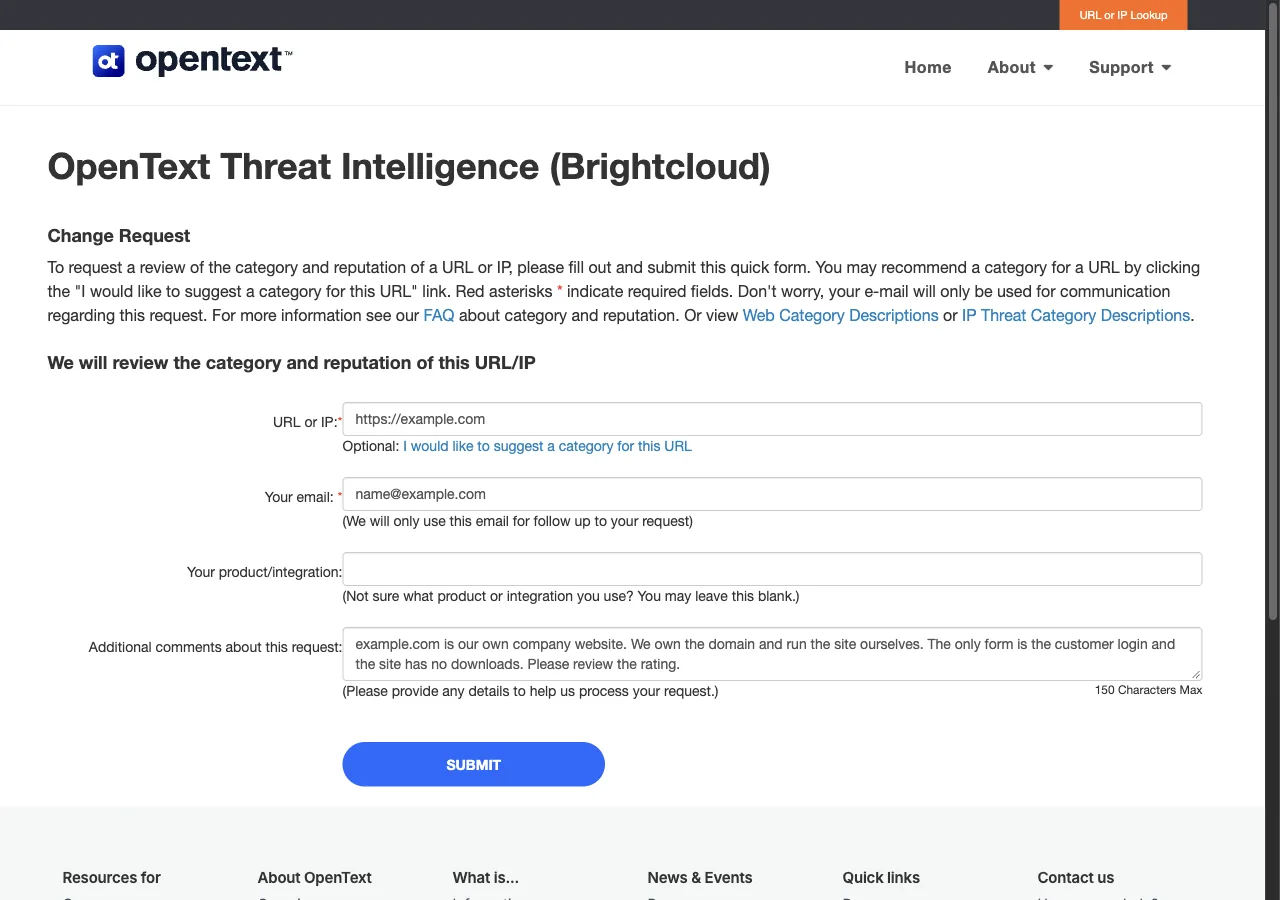
Website in the wrong category

URL or IP:            example[.]com
Suggested category:   (optional) pick the category that fits your site
Your email:           name[at]example[.]com
Your product/integration:
                      (optional) the product that shows the block
Additional comments:  Our company site is in the wrong category. We own
                      the domain and sell only our own products.
                      Please review.
Wait and check the result
The OpenText FAQ says: "Our Web Analysts typically process all requests within 24 to 48 hours after they are received." A reclassified IP address "normally takes us a bit longer." Products that read the feed can take extra time to update, and the FAQ says some devices need their cache flushed. After the review, look up your URL in the URL or IP lookup again and compare the category and the score with the values you wrote down.
Other ways to report
Webroot / BrightCloud explains its own rules for false positives on these pages: